


Your account safety is important to us. Sometimes scammers try to trick users into giving away login or payment information. This is often called “hijacking” or “hacking,” and it can be tough to spot. This guide is designed to help you stay safe and know exactly what to do if your account is targeted.
Table of Contents:
How Scammers Try to Steal Accounts
-
Phishing Emails: Scammers send emails that look like they are from Puppies.com. They may request your login info outright, or try to redirect you to a fraudulent website designed to steal your password.
-
Fake Support Profiles: Some scammers create fake Puppies.com user accounts and send messages through our on-site Message Center pretending to be members of our Support Team.
-
Credential Stuffing: Accounts are also at risk if you use a weak password, reuse the same password across multiple websites, or share your login information with anyone.
A Recent Scam to Watch Out For
Scammers have recently created fake user accounts and messaged sellers through our Message Center, pretending to be "Puppies Support." They asked for credit card details to “unlock buyer messages” or “verify” accounts.
⚠️ Puppies.com Support will NEVER:
Create a standard user account to message you through the Message Center.
Ask for your password, your verification codes, or your full credit card number over the phone, by email, or through the Message Center.
Take payments over the phone.
Note: We may sometimes ask for the last 4 digits of your card to help look up a transaction, but we will never ask for the full number or expiration details.
-
What to do: If you receive one of these scam messages on the site, click the red REPORT button in that Message Center thread immediately. If you already shared your card information, monitor your bank statement and contact your financial institution right away.
How to Verify Official Puppies.com Emails
-
Check the Sender: Official emails from us will only come from domains ending in
@puppies.com. Our primary addresses are: -
Look for Verification: In Gmail, Apple Mail, and Yahoo, our legitimate system messages include our official logo and a verified checkmark next to our name. Always click or tap on the sender’s name to expand the full email address and confirm it matches the list above.
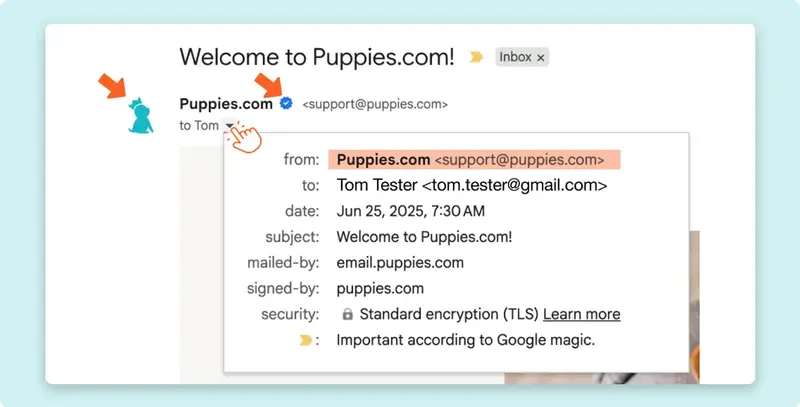 Our logo and the "verified" checkmark (both indicated with arrows) help confirm that the message is legit.
-
Go Direct: When in doubt, type www.puppies.com directly into your internet browser's address bar to log in, rather than clicking any links inside a suspicious email.
Signs Your Account May Be Compromised
You should contact support immediately if you notice any of the following red flags:
-
You have sudden trouble logging in with your usual, correct password.
-
You receive password reset emails that you did not personally request.
-
You notice messages in your Message Center sent from your account that you did not write.
-
You see changes to your active listings, contact information, or account settings that you did not make.
How to Protect Your Account
-
Bookmark the Site: Always log in by typing www.puppies.com directly into your browser or using a trusted bookmark instead of following email links.
-
Use Unique Passwords: Create a strong password that you only use for Puppies.com. Never reuse your email password or banking password on our site.
-
Make it Complex: Ensure your password uses a strong mix of numbers, special characters, and both upper- and lower-case letters.
-
Secure Your Email: Keep your personal email account secure, since it holds the keys to resetting your Puppies.com login.
What to Do If You Think You’ve Been Hacked
If you suspect someone has accessed your account, please follow these steps in order:
- Change your password immediately: Log in and update your Puppies.com password to a strong, completely new one.
- Secure your email account: Update your personal email account password as well, just in case the hacker has access to your inbox.
- Contact Support: Reach out to us directly at [email protected] so we can secure your account, audit recent changes, and help you restore clean access.
- Protect your finances: If you shared payment information, keep a close eye on your statements and report any unauthorized or suspicious charges to your bank right away.
Most account security issues can be resolved smoothly if they are caught early. Don't panic! Approach the situation carefully, secure your login methods, and notify our team so we can assist.
Still Have Questions? If so, our Support Team is here to help! Please don’t hesitate to contact us through our Contact Page (or email us directly at [email protected]) and we’ll be happy to assist.

