


While our Support Team works hard to block scammers and remove fake accounts, we cannot guarantee that every user on the site is legitimate. This guide is designed to help both Sellers and Buyers recognize common internet scams to protect your accounts, personal information, and finances.
Table of Contents:
Part 1: Common Scams Aimed at Sellers
Social Engineering & "Fake Payment" Scams
This scam often starts when a buyer aggressively pushes to send you a deposit via Cash App, Zelle, or Venmo, and then asks for your email address.
-
The Trick: While some payment services may legitimately use an email address to send money, scammers often request it so they can send a highly convincing fake receipt or payment notification that appears to come from your bank or payment app.
-
The Goal: They want you to believe the money is "pending" or "sent," prompting you to hand over a puppy before you realize no actual funds ever reached your account.
-
How to Avoid It: Never rely on emails, text messages, screenshots, or payment notifications provided by the buyer. Always open your official banking or payment app independently and verify that the funds have actually been received before releasing the puppy.
Fake Video Call (Zoom/Google Meet) Malware Scam
A fraudulent buyer messages you asking to schedule a Zoom or Google Meet call to "discuss the puppy." They insist you join from a Windows desktop or laptop computer, then ask for your email address so they can send you the invite link directly.
- The Trick: If you have any trouble connecting, the scammer sends a follow-up message claiming your Zoom is outdated and instructs you to download a file called "ZoomWorkspace" — and to click "Yes" if a security warning pops up. That warning is your computer trying to protect you. Clicking past it installs malware.
- Watch for messages like these:
- "Hi, I'm interested in your puppy and would like to schedule a brief Zoom or Google Meet call to discuss a few important details. Please let me know your availability!"
- "Do you own a desktop computer to join the call?"
- "The invite setup I'll be sending is designed to work on Windows laptops or desktops during the initial connection."
- The Goal: Once installed, this software can steal the login cookies stored in your browser, meaning the scammer can access your Puppies.com account, your email, and even financial accounts without ever needing your password, bypassing two-factor authentication entirely.
- How to avoid it: Legitimate buyers do not require you to download software, bypass security warnings, or move off-platform to receive a meeting link. If a "buyer" insists on a desktop-only Zoom call and asks for your email address before you've vetted them through the Message Center, do not engage further — report them using the red REPORT button.
Overpayment & "Business Account" Traps
A buyer claims they accidentally (or intentionally) sent you more money than the price of the puppy, or they claim a payment is "on hold" because your account isn't a "Business Account."
-
The Trick: They will send a forged screenshot claiming they must send you an extra $100–$500 to "expand your account limit," and then ask you to send that extra money back to them.
-
The Reversal Trap: If a scammer sends money via a stolen credit card or a fraudulent check, the bank will eventually reverse the charge. You will be held financially responsible for the full amount of the original payment plus any real money you "refunded" to the scammer.
-
How to avoid it: Never agree to accept overpayments or "forward" money on behalf of a buyer.
Six-Digit Code (2FA) Phishing
A buyer text messages you asking you to "confirm you are a real person" by reading back a six-digit code they just sent to your phone.
-
The Trick: The scammer is actually at the Puppies.com sign-in screen (or your Gmail/iCloud screen) typing in your phone number and hitting "Forgot Password." The code sent to your phone is a security reset code. If you give it to them, they will hijack your account.
-
How to avoid it: Never share a verification code with anyone, for any reason.
Part 2: Common Scams Aimed at Buyers
The "Too Good to Be True" Price & Fake Listings
Scammers will create fake breeder profiles using stolen photos of popular or expensive breeds (like French Bulldogs, Poodles, or Golden Retrievers) and list them at unrealistically low prices to lure in buyers quickly.
-
Red Flags: The seller refuses to let you see the puppy via a live video call (like FaceTime or Zoom), makes excuses about why you can't visit in person, or pressures you to put down a deposit immediately before someone else takes the puppy.
-
How to avoid it: Always ask for a live video call to see the puppy and the mother moving around in real-time. If a seller can only provide static photos or pre-recorded videos, walk away.
- ⚠️Note: if someone pushes for a Zoom call and asking you to download software, see the Fake Video Call Scam in Part 1.
The Fraudulent Shipping & Transport Scam
Once a buyer pays a deposit or the full price for a puppy, the "breeder" claims they will ship the puppy using a private pet transport or airline service.
-
The Trick: A few hours later, the buyer receives an urgent email or call from a fake "pet shipping company" demanding hundreds of dollars in unexpected fees for a "climate-controlled crate," "forced pet insurance," or "urgent vet checks." They claim the puppy will be abandoned or confiscated if you don't pay.
-
The Reality: There is no puppy, and there is no shipping company. The scammer is running both sides of the operation to squeeze more money out of you.
-
How to avoid it: Whenever possible, pick up your puppy in person. If shipping is required, independently research and verify the transport company yourself. Never pay unexpected, last-minute shipping fees via untraceable methods.
Part 3: Common Threats to Both Buyers & Sellers
Phishing Emails & Fake Websites
Scammers send emails that look exactly like official Puppies.com system alerts, claiming your account is suspended or that you have a new message. They include a link to a fake login page designed to steal your password.
-
Check the Sender: Official emails from us only come from domains ending in
@puppies.com(such as[email protected]or[email protected]).In Gmail, Apple Mail, and Yahoo, legit messages now include our logo and a verified checkmark. Click the sender's name to see the full email address and domain:
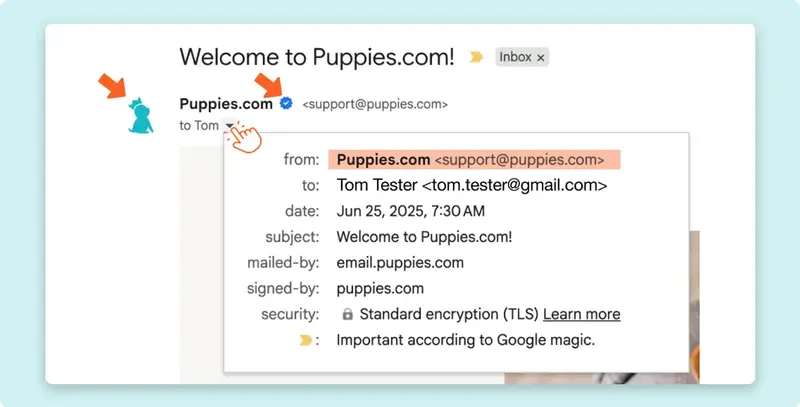
Our logo and the "verified" checkmark (both indicated with arrows) help confirm that the message is legit. -
Check the URL: Look closely at your browser's address bar. If the website address does not say exactly puppies.com, do not enter your password.
- Avoid links in emails. Scammers can disguise links included in emails to look like Puppies.com, but they actually route to a fraudulent website to steal your info. Enter Puppies.com directly in your browser's address bar, or bookmark our site to return to it later.
Fake Customer Service
Scammers may call, text, or email pretending to be Puppies.com Support, asking for your password, your verification codes, or your full credit card information.
-
Our Policy: The Puppies.com team will never ask for your password, your verification codes, or your full credit card number over the phone or via email, and we never take payments over the phone.
- How to avoid it: If you receive a suspicious message, forward it to [email protected] for review. We'll be happy to check our records to let you know whether it actually came from us.
Summary Checklist: Trust Your Instincts
✅Keep Conversations on the Site. Scammers almost always try to pull you off the Puppies.com platform immediately to text messaging or WhatsApp because they know our system flags suspicious text patterns. If you need to eventually move the conversation off-site, only do so after vetting the user to your satisfaction through the Puppies.com Message Center.
✅ Never download software at someone else's request. Legitimate buyers and sellers will never ask you to install a program, click past a security warning, or download a file sent to you via email to join a video call. If you need Zoom or Google Meet, download it directly from the official website, never from a link provided by another user. This is a common red flag for malware designed to silently steal your saved passwords, active login sessions, and financial data.
✅Use Protected Payments. Most peer-to-peer apps (like Zelle, Cash App, and PayPal Friends & Family) offer zero fraud protection for commercial transactions or the sale of live animals. Do your research! Look into the drawbacks of different payment platforms, figure out if payments can be recouped in the event of fraud, and determine what payment methods you're comfortable with.
✅Report Scams Immediately. If you get a suspicious email, forward it to [email protected].
-
If you receive a strange message through the site, click the red REPORT button under the message.
-
If you see a listing that looks fake, click the red REPORT button at the bottom of the listing page.
✅Don't make rushed decisions. Scammers often try to create a fake sense of urgency to keep you off balance and urge you to make hurried decisions without thinking things through. Don't fall for it! Do your research, think things over carefully, consider the risks, and contact us for assistance or advice if necessary.
✅Most importantly, remember: IF IT SEEMS TOO GOOD TO BE TRUE, IT PROBABLY IS.
Still Have Questions? If so, our Support Team is here to help! Please don’t hesitate to contact us through our Contact Page (or email us directly at [email protected]) and we’ll be happy to assist.

